Life Below

The world's oceans are precious and magical, but also in danger. In Life Below, you dive into the life beneath the sea, and it is up to you to build, manage and develop large coral reefs from the bottom up. It is not a 'city-builder', but a reef builder! Welcome to life under the sea, where you control the future of the ocean!

Co-Funded by


Accessibility in Life Below
From the very start of the project, accessibility was really important for us to prioritise. We made a list of what accessibility features we felt we had to get in at the same time as our first draft of a feature list. With the help of some amazing external experts, we took that list from an idea to implemented features and philosophy that has been held through all of development.
The following features could not have been made without the amazing work of the entire team, our extremely helpful experts, and those who have playtested the game. Thank you, and hope you enjoy Life Below however you like to play!
The following features could not have been made without the amazing work of the entire team, our extremely helpful experts, and those who have playtested the game. Thank you, and hope you enjoy Life Below however you like to play!
Accessibility settingsThe first time you launch Life Below you can access the settings directly from the title menu, including all accessibility options. The accessibility settings menu brings together selected options from across the game into one place. Any changes made here will also apply to the same settings in their original menus. All settings are explained with text, and some also with video or pictures.
Difficulty settingsWhen starting a new game each save slot let’s you choose between three difficulty settings; easy mode, balanced mode and challenge mode. There is also a separate mode for Freeplay/Sandbox mode where you can choose a Peaceful difficulty. You can manually save your progress at any time.
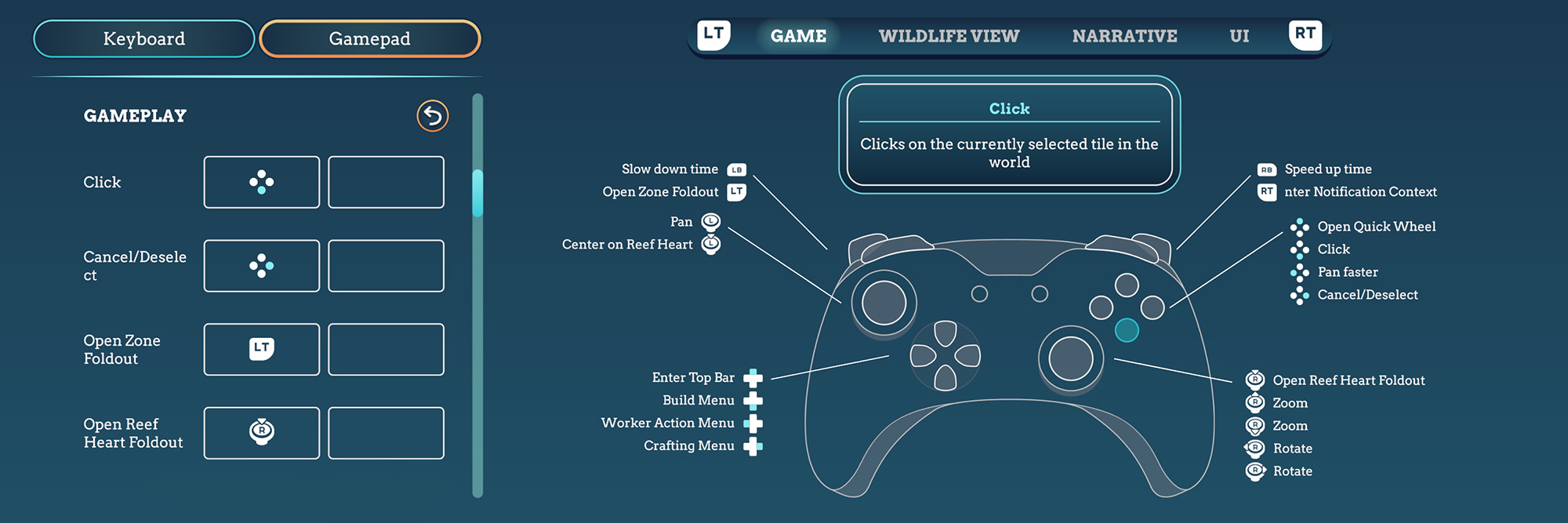
Device supportLife Below can be played using keyboard and mouse, controller, or mouse only. The game is also compatible with alternative input devices such as the Xbox Adaptive Controller and similar accessibility tools for PC.
The game is fully playable using only the left mouse button and mouse movement making it accessible for players who rely on simplified input methods. To make camera control easier when playing mouse-only, we recommend enabling the On Screen Camera Button.
All on-screen controller prompts automatically update based on the active input device. The game automatically reacts to your input device, but can also be manually set in the settings menu.
It is also possible to change how row-based UI movement works when using a controller in the settings. When enabled, navigation is locked to rows, moving step by step horizontally or vertically. When disabled, the joystick moves to the nearest selectable element in any direction, allowing selection to jump across rows, including diagonally.
Difficulty settingsWhen starting a new game each save slot let’s you choose between three difficulty settings; easy mode, balanced mode and challenge mode. There is also a separate mode for Freeplay/Sandbox mode where you can choose a Peaceful difficulty. You can manually save your progress at any time.
Device supportLife Below can be played using keyboard and mouse, controller, or mouse only. The game is also compatible with alternative input devices such as the Xbox Adaptive Controller and similar accessibility tools for PC.
The game is fully playable using only the left mouse button and mouse movement making it accessible for players who rely on simplified input methods. To make camera control easier when playing mouse-only, we recommend enabling the On Screen Camera Button.
All on-screen controller prompts automatically update based on the active input device. The game automatically reacts to your input device, but can also be manually set in the settings menu.
It is also possible to change how row-based UI movement works when using a controller in the settings. When enabled, navigation is locked to rows, moving step by step horizontally or vertically. When disabled, the joystick moves to the nearest selectable element in any direction, allowing selection to jump across rows, including diagonally.


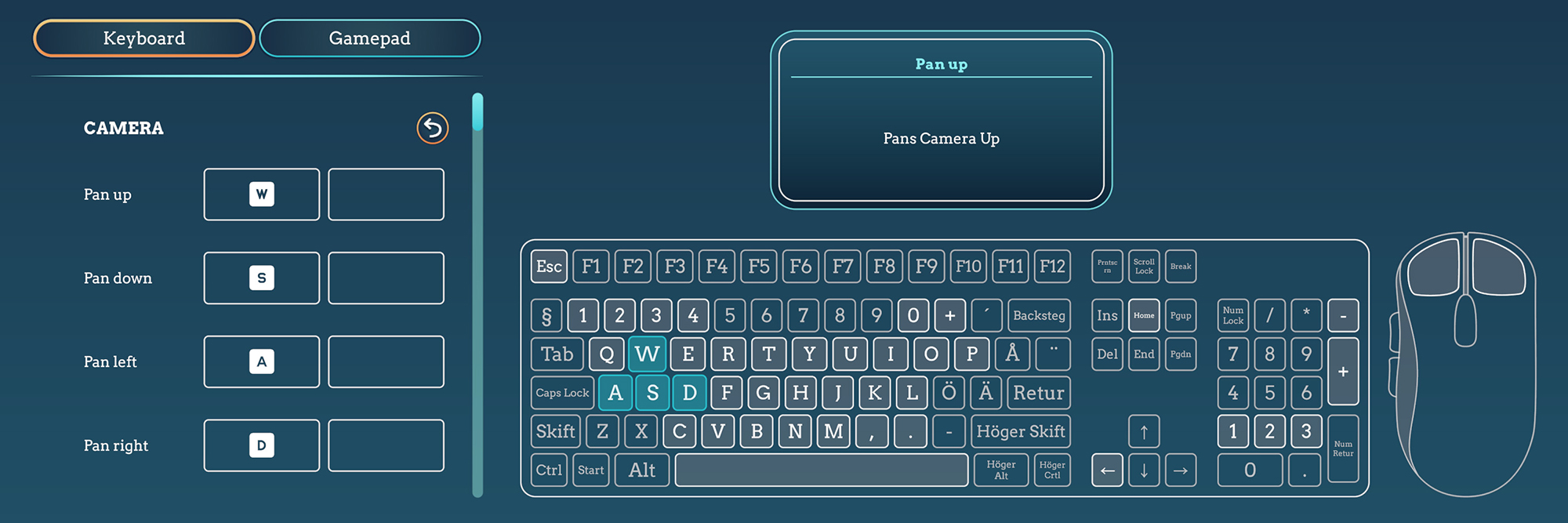
Button remappingLife Below has full input remapping support. You can locate any button by pressing it on the on-screen controller image, which takes you directly to the corresponding key binding option.
Button remappingLife Below has full input remapping support. You can locate any button by pressing it on the on-screen controller image, which takes you directly to the corresponding key binding option.
Other motor accessibilityThe game is playable without rapid button presses. Some actions require holding a button, such as skipping cutscenes and closing tutorial windows.
There are no QTE (Quick time events) in Life Below.
You can enable an input cooldown that adds a 0.5 second delay to each button press. This only applies to buttons and does not affect inputs like joystick movement or WASD.
To reduce the number of button presses you can enable the stamp style multiselection, which lets you select multiple tiles at once when using worker actions.
Other motor accessibilityThe game is playable without rapid button presses. Some actions require holding a button, such as skipping cutscenes and closing tutorial windows.
There are no QTE (Quick time events) in Life Below.
You can enable an input cooldown that adds a 0.5 second delay to each button press. This only applies to buttons and does not affect inputs like joystick movement or WASD.
To reduce the number of button presses you can enable the stamp style multiselection, which lets you select multiple tiles at once when using worker actions.

Audio settings & volume slidersLife Below includes multiple volume controls: master volume, music volume, sound effect volume, ambient volume, and UI volume. No part of the gameplay relies on audio cues only, making the game fully playable for Deaf and hard of hearing gamers.
The game use stereo audio and does not include an option to switch to mono sound.
Adjustable game speed & pause optionsLife Below lets you change the speed of the game at any time during gameplay, and you can pause whenever needed.
In the accessibility settings you will find options to pause the game on critical events and on unfocused. You can also choose to automatically pause when opening selected full screen panels such as the crafting menu, zone overview, wildlife migration panel, growth menu, guidebook, and quick wheel, either individually or all at once.
Accessible options for motion sensitivityLife Below includes several accessibility options to reduce motion and improve comfort during gameplay. In the settings you can enable the mini map to be north-locked, adjust camera pan speed and UI scroll speed, and disable edge scrolling.
Additional options such as reduced motion for the UI, disabling the typewriter effect for text, and turning off camera shake can help create a more comfortable experience.
Colour blind supportLife Below is colour blind supported, as no part of the game design relies only on colour to understand and interact with. You can also adjust display settings like contrast and gamma to better fit your gameplay.
Other visual accessibilitiesUI size can be adjusted from 0,87x to 1,18x. Changing the UI size will also affect the text size, but there is no separate setting for this.
You can set the size of your cursor from 0,1x to 1,0x, and enable context-specific cursors.
You can also enable or disable transparent backgrounds for some UI elements in the settings.
Life Below does not include screen reader support, as it was not possible to implement this in the current project. We hope to include this support in future titles.
Low resource warningsTo help you stay on top of your resources, the game can warn you if you are running low on pearls, coral matter, coral plates, or infused corals.
Audio settings & volume slidersLife Below includes multiple volume controls: master volume, music volume, sound effect volume, ambient volume, and UI volume. No part of the gameplay relies on audio cues only, making the game fully playable for Deaf and hard of hearing gamers.
The game use stereo audio and does not include an option to switch to mono sound.
Adjustable game speed & pause optionsLife Below lets you change the speed of the game at any time during gameplay, and you can pause whenever needed.
In the accessibility settings you will find options to pause the game on critical events and on unfocused. You can also choose to automatically pause when opening selected full screen panels such as the crafting menu, zone overview, wildlife migration panel, growth menu, guidebook, and quick wheel, either individually or all at once.
Accessible options for motion sensitivityLife Below includes several accessibility options to reduce motion and improve comfort during gameplay. In the settings you can enable the mini map to be north-locked, adjust camera pan speed and UI scroll speed, and disable edge scrolling.
Additional options such as reduced motion for the UI, disabling the typewriter effect for text, and turning off camera shake can help create a more comfortable experience.
Colour blind supportLife Below is colour blind supported, as no part of the game design relies only on colour to understand and interact with. You can also adjust display settings like contrast and gamma to better fit your gameplay.
Other visual accessibilitiesUI size can be adjusted from 0,87x to 1,18x. Changing the UI size will also affect the text size, but there is no separate setting for this.
You can set the size of your cursor from 0,1x to 1,0x, and enable context-specific cursors.
You can also enable or disable transparent backgrounds for some UI elements in the settings.
Life Below does not include screen reader support, as it was not possible to implement this in the current project. We hope to include this support in future titles.
Low resource warningsTo help you stay on top of your resources, the game can warn you if you are running low on pearls, coral matter, coral plates, or infused corals.
Reviews
No items found.